Test Environment Management and DevOps

Why DevOps Needs Test Environment Management

Testing is an essential component of software development. Modern software developers live by the mantra, "If it isn't tested, it isn't done." There's a lot of focus on unit and acceptance testing, but organizations often slip when it comes to practical system testing. That is, many projects fail to put all the parts together and check their interactions.

Sometimes the reason for this is simple: we don't have a good testing environment.

In this post, I will discuss why this is and detail some of the side effects of missing out on that good environment. I'm going to start by creating some context, then I'll talk about fundamental practices that can be applied to the general problem, and I'll close out with a discussion on testing environments.

Why Don't We Have Good Testing Environments?

Organizations face a number of competing factors when it comes to software development and deployment. There are the first and obvious issues of building the right thing and having a stable solution that users like. Within our organizations, we are always working to balance the cost of development and the cost of operations. We find that cost minimization is hard to achieve when we have these two goals.

Further, the creation and maintenance of each environment is a complicated and time-consuming activity. Coordinating multiple environments has a multiplicative effect on cost. Employees also suffer from fatigue and distraction. Being consistent and thorough becomes more and more difficult as complexity increases. Each of these factors leads to increased cost through waste and rework.

So that's the problem. How do we fix it?

Tradition vs. the New Way

Traditionally we establish one or more test environments. Often our test environment is a smaller version of production. It may not contain the same volume of data. There may not be the same amount of network traffic. The servers might not have the same number of cores or amount of RAM.

This is not the most effective way of testing the system as a whole—we all know that. But there are always reasons that we do it.

The new way of doing things is to create a production environment and run the tests. That is, we automate the infrastructure to the degree that we can create an entire environment with a simple button click and execute our test suite.

We should be building our test environments with the new way in mind as our ideal. That said, there are still many issues that we need to deal with in order to achieve this goal. The following are the heavy hitters on our issue management list.

What Do We Need for Better Testing Environments?

First, it's essential that you carefully lay out what tools you'll need and how they will be used. Having a solid foundation to start with will be helpful later on, so don't skimp on the thinking here. Identify the capabilities you are looking for in setting up an environment. Then ensure that you have the tooling in place to support that. It's much easier to build things into the system in the first place.

Having said that, like with all things, plan only for what you know you need. Don't be overly speculative or overly ambitious. Focus on what you know to be true about the end-state and work to make that a reality.

There is an ever growing list of tools available to help with every aspect of managing your environment. First off, cloud providers universally provide working APIs for every aspect of configuration, allocation, deployment, and provisioning. On top of those APIs there are often whole SDKs and CLIs to make using them even easier. Beyond that, there are 3rd party tools that make the use of those SDKs almost transparent.

As we consider how to create a good test environment, there are a number of considerations that we need to keep in mind.

What Makes for a Good Testing Environment?

The problem you might encounter is that there are so many tools you can't keep track of them. Further, not all of the tools and components may be entirely in your control. The difficulty here is balancing a lean solution against the vast array of available tools for managing that solution. Finding a tool that is light and easy to apply is a first order knowledge problem; how do you make a decision about an ever-changing environment to which you have little control without arriving at a possibly irreconcilable conflict?

This conundrum can be resolved with a light touch. If you can create a lean solution that satisfies your platform requirements, you have a basis for discovering cost savings without sacrificing capabilities.

This is where Test Environment Management (TEM) comes into your plan. At least in part, TEM can help you wrangle all these components and manage their use and deployment.

For good TEM, you'll need the following components.

  1. Testability

Modern software is tested software. Over the last 20 years, we have changed the way we make software by adding a tremendous focus on testability. While the debate rages on about what the most effective means of testing is, one thing we can count on is: there will be tests.

Building a systems infrastructure that supports testability is absolutely necessary for a modern delivery pipeline. So when we think about the capabilities we will need, it is somewhat of a foregone conclusion that we will be able to test the infrastructure before deployment.

So our test environment itself must be testable. Validation of the environment itself is a critical feature of our solution.

  1. Configuration Management

If we're going to use automated releases, we have to have good configuration management. Because we will make all our environments essentially the same way, this should be a straightforward process of identifying the configuration and codifying that into our build process. When we have done this, all environments going forward will be consistent.

  1. Release Management

Just as we would with a production release, our test environment is going to need release management. We need to know what features and fixes are contained in a release so we understand what we should be testing. This requires us to integrate our change management system, source control tools, and release process.

  1. Networks

Network configuration is a concern we must also address. Each deployed environment needs to function with a minimum amount of customization. That is, just because the deployment is to a test environment doesn't mean we should have to reconfigure every service. Virtual networks, Kubernetes, Docker-Compose, and other tooling can minimize these customizations.

  1. Load and Volume Testing

One thing that can be difficult to emulate in our test environment is message volume. In order to test load and performance, we will need some means of creating a transaction volume similar to production. For many web applications, this isn't overly complicated, but for an IoT solution with hundreds of thousands of devices, this can be a daunting task. Careful consideration of these needs is required in planning a test environment. There will be a lot of heavy lifting.

  1. Incorporation of Databases

Similar to message volume, test data is often a challenge. When planning a testing environment, we need to accommodate not only the database configuration, but also the volume of data in order to ensure that we have a proper simulation of the real world.

One approach is to develop a data loader that simulates real data. This loader is executed between the environment creation and test execution steps. Of course, this can be a challenging task for large systems. An alternative is to make copies of production systems. There are several laws we need to be sure we observe when we make copies of systems related to financial and privacy regulations; data masking can be as challenging as simulated data loading.

For greenfield development, getting ahead of these issues will save you a lot of pain and suffering. In the brownfield, developing a careful plan will help you immensely; organic growth in this area yields results, but often with the consequence of interrupted or delayed deployments as issues arise and data is backfilled into the process.

  1. Production's Security Settings

A final issue to be considered is security. In order to get a realistic test of our system, we need to include all of the security settings our production environment has. This includes establishing users with different roles, server certificates, network restrictions, and all of the other settings and configurations we have in production. Because we have automated the deployment process, this shouldn't be difficult to do, but it does increase the number of things we need to keep track of.

What Are the Risks of Not Having a Good Testing Environment?

I've described a complex system of testing environments and automation in very abstract terms. I'll add to those generalizations an important takeaway: if you don't have a consistent, reliable, and fast testing environment, you are at great risk for failure.

I don't mean your project will fail. I mean you are at risk that any particular deployment won't go well. If you don't manage your test environment well, it's easy to can get wrapped up in the test cycle with systems that won't deploy or tests that cannot execute. You might even release bugs because your test environment is tolerant of things that production won't allow.

It is essential that your organization puts effort into the creation, growth, and maintenance of an automated testing environment in order to maximize the effectiveness of your development efforts.

So, Why TEM?

All of the above are necessary components of a modern software delivery pipeline. As organizations move toward continuous deployment, the need for automation grows, and more tooling is necessary to enable that automation. Test environments specifically need additional management in order for things to run smoothly and cost-effectively.

If you want to get into more detail, there are a number of articles and posts elsewhere on the general topic of Test Environment Management (TEM). If you are looking to dig deeper into the topic, I can suggest this article that describes the Use Case for TEM and this one discussing the cost of an inefficient test environment.

Failure to create these test environments puts the organization at risk and can be very costly. In order to create test environments with any reasonable amount of consistency, you must manage them. Therefore, test environment management needs to be a required component of your environment.

Author Rich Dammkoehler

This post was written by  Rich Dammkoehler. Rich has been practicing software development for over 20 years. In the past decade, he has been a Swiss Army Knife of all things agile and a master of agile fu. Always willing to try new things, he’s worked in the manufacturing, telecommunications, insurance and banking industries. In his spare time, Rich enjoys spending time with his family in central Illinois and long-distance motorcycle riding.

How to Achieve Continuous Delivery

How to Achieve Continuous Delivery

So you've decided to get on the continuous delivery train. Congratulations! You're about to turn your deployments from anxiety-inducing to yawn-inducing, which is a luxury non-CD shops will never know. Will it be easy in the short term? Well, let's put it this way: there will need to be some changes to how you approach things. And you'll have to convince your colleagues to change the way they approach things, too. But there are steps you can take to make this transition easier for all. That's what we'll talk about today—your path to successfully doing continuous delivery.

What CD Even Is, Though

First, let me give you a quick summary of the subject at hand. Continuous delivery means packaging every significant code change and pushing it through an automated pipeline of steps until it reaches production. Commonly, these steps act as gatekeepers to the Great Beyond of your prod environment. They're your portcullises and moats. The job of these gatekeepers is to ensure your code is truly ready to enter the wild. Common steps include running automated unit tests, acceptance tests, and smoke tests. A continuous delivery pipeline also includes promoting your package to higher environments and smoke testing them. This is all done so we can eventually make deployments so uneventful that they're boring, reducing risk and saving a boatload of cash and frustration.

How Do We Get There?

If you've read the book Continuous Delivery by Jez Humble and David Farley or if you've perused a few blogs, you may feel overwhelmed at first. Continuous delivery can be a lot to take in. But fret not. We will eat this elephant one step at a time, making it a bearable and possibly fun process.

The principles we'll follow, straight out of Humble and Farley's Continuous Delivery, are to document our steps, continue with those steps even if—especially if—they become painful, and then automate them away. This requires a large dose of tenacity. You have to be willing to stick with it, possibly for an extended period of time. In my experience, this tenacity almost always pays off, often faster than you may think.

Document Your Existing Steps

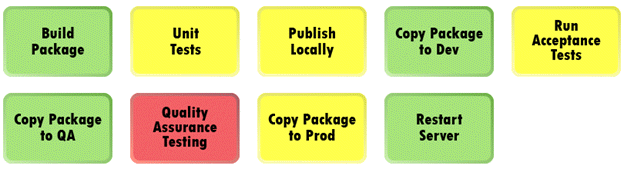
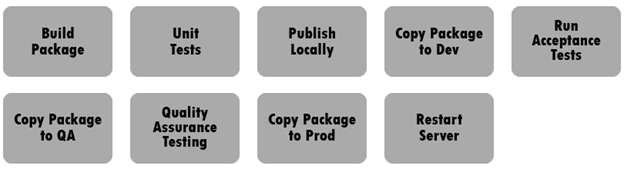
Starting your journey is as simple as documenting all the steps it takes your system to go from code that's committed and pushed to when it's in production and available to consumers. And yes—you need to document every step. You'll be surprised at how many there are. Pull everyone involved as you need them. Any gaps in the documentation must be fleshed out. Talk to your developers, your QA specialists, your release manager, etc. Talk to your system administrator if you need to. Get it all in one visualization. By the end you should have something like this:

Make sure you understand who owns or commonly performs each step. Sometimes this is a system, but more often, it's a person. If you have trouble showing or understanding the steps, think of your pipeline as a conveyor belt with one thing moving through it: the software package. You may decorate this package with other things, like config files. It may also morph into a different kind of package—for instance, from an executable into a Docker container. But it's still one thing moving through each gated step.

Make Friends

Ultimately, continuous delivery and DevOps is not so much about the tooling but about the people. It's about collaboration and focusing on what matters, and it's about delegating boring deployment work to computers. However, not everyone may take that view. Many people have built up little kingdoms around their role in getting the code to production. They may see your initiative to automate as a threat.

You'll want to understand and have compassion for all the people involved in deploying your system. This may be as easy as giving a heads up. It may be as involved as being vulnerable with them and letting them share their concerns. And at the end of it, you may still have to add a silly button to your deployment server and let them push it. Just remember: it's as much about the people as it is the tooling.

Version Your Package

Ensure your software packages are versioned. You want to know you can grab any build you need and push it through your pipeline. This will make both troubleshooting and tracking easier. Also, ensure that your package is IT & Test Environment agnostic; that is, don't tie your built package to any specific environment, such as dev or prod. We'll wire in the environment-specific stuff later.

Publish Your Package

After you build, version, and unit test your package, publish it to a well-known place. This will make your package available to deploy to multiple environments without rebuilding and unit testing every time. It will also ensure you have a consistent build. You can use something as simple as a shared network drive, but many tools exist to make it easier. Maven and Gradle have the ability to publish built in. Many continuous integration servers also have some sort of publishing mechanism wired in, depending on your language.

Find the Biggest Pain Point

Now the fun part. Document what the biggest pain points are on your diagram, like I did here:

Green is already automated or low pain, and red is the highest pain. You want to ensure the team is doing this painful step as much as possible. The instinct for them will be to run away from it and avoid it. Instead, we want to equip the team with what they need to get rid of it.

Automate the Pain Away

The next step in our path to continuous delivery is to take the pain point from the previous step and figure out how to automate it. There are many, many tools available, depending on the step that's red for you. For testing steps, you can automate your tests. Use a unit testing framework, or Postman, or a more comprehensive testing tool. This is another place where people, namely QA specialists, may think of moving to CD as a threat. It also can be a whole initiative on its own.

For deployment steps, there are many tools to automate the publishing and pushing of your system onto a server. I highly recommend investing in a deployment server. It will save you loads of time automating your pipeline. However, if you're not confident in one or have budget troubles, you can automate with as little as your command shell and some SSH. Something more in the middle can be a task runner like Gradle or even some PowerShell modules. Parameterize these scripts by version number and environment.

You may not be able to automate your most painful step, or you may find it a steep learning curve. That's alright. If it's too difficult, find something similar to start with. You can also mitigate the manual parts down to a few button clicks. That helps. As long as you can remove enough of the pain your red step causes to make it no longer the most painful one, you're moving in the right direction.

Rinse, Repeat

Aggressively and continuously repeat the previous steps. Once you automate most of your painful steps away, your entire team will have an amazing change of attitude when it comes to deployments. It will feel like a large weight has been lifted off your shoulders. Ideally, with one button push, you can get your system from your package repository all the way to production. Most likely, you'll need to press one button per environment. Even then, it'll still be a breath of fresh air compared to the way it was before CD. Nonetheless, you'll want to keep automating until you achieve the one-button-push deployment.

I'm Done Now, Right?

Even though your deployment life will be much easier, I wouldn't stop there. Once you have an effective deployment pipeline, you can do many beautiful things with it. You can make it a zero-downtime deploy. Your team can add feature toggles so you can separate your deployments from your releases. And of course, you should continue to refine and evolve the pipeline as you find new or smaller pain points along the way.

You're on Your Way

As you can see, achieving continuous delivery is well within your reach. It's simple, yet you must persist through all the blockages. Focus on people and showing them how continuous delivery eases their role. Continually and aggressively knock one obstacle down at a time, and you'll be there sooner than you think!

Author Mark Henke. 

Mark has spent over 10 years architecting systems that talk to other systems, doing DevOps before it was cool, and matching software to its business function. Every developer is a leader of something on their team, and he wants to help them see that.


OMG DevOps at Scale

The Keys to DevOps at Scale

"An organization that’s operating at scale can grow to meet greater demand without too much hassle."

When it comes to DevOps, it's important to know where organizations generally fall short, but every organization is different. We have to identify where there's waste and what inefficiencies prevent you from delivering software rapidly, consistently, and securely. In this post, we'll cover some keys to DevOps at scale so that you can make your DevOps initiative work in a big organization.


Set the Foundation to Create a Great Culture

People are at the heart of every DevOps initiative. Making sure they're effectively communicating is the first key to scaled DevOps.

In big organizations, people are used to delivering software in certain ways. These people aren't known for changing process and technologies often. That's because as a company grows, coordination and communication get more complicated.

A key thing then is to change how people work together to deliver software. And I'm not just talking about developers and operations. Marketing, product owners, managers, testing, and especially senior management needs to understand what DevOps means and how their work will be impacted. These people must be engaged in the DevOps journey.

You can start by doing workshops to discover waste and inefficiencies. Then you'd define the initial action items for the first sprint of many iterations that you'll need to do to increase efficiency. AWS developed a Cloud Adoption Framework (CAF) to help organizations get on board with the cloud. I happen to find CAF helpful for the things that also have to adopt DevOps.

Your team should make the effort to agree on how to better work together. They don't need to be best friends. But when they know each other and understand the needs of other teams, then they can find a balance that works for everyone.

Laying the foundation for people to collaborate is the hard part. Luckily, we're about to talk about the easiest problems to solve—technology problems.

Decouple Architecture to Deploy Frequently

When an organization is spending too much time fixing and debugging problems and they don't have time to reduce the technical debt, then applying DevOps might add more complexity.

Architecture is the next key to DevOps at scale. That's because big companies usually have a ton of interconnected systems where if you try to change something, you might break something else. Tightly coupled architectures need the coordination of many people to release software.

To support this section, I'll refer to what I initially heard from Jez Humble in a podcast about architecture in continuous delivery (CD). Testing and deployment are the main focuses of CD architecture. More specifically, it's important to ask these two questions:

  • Is it possible to do testing without requiring an integrated environment?
  • Is it possible to do releases independently of other systems or services?

Decoupled architectures give you the independence to test software without needing to install and configure other parts of the system. Instead, testing is done using mock objects because there's already a contract.

Deployments or releases can be done without having to update other applications. You're not breaking any agreed-upon contract, like response formats. It's also going to be possible to release frequently and in small batches—the two essential features of CD or DevOps.

Solidify Engineering Practices for Releases

The next key to DevOps at scale is to solidify your engineering practices.

The first time I heard about how Google runs production systems was when I read the Site Reliability Engineering (SRE) book. I loved how Ben Treynor defined SRE as "what happens when a software engineer is tasked with what used to be called operations."

A software engineer gets bored easily. Well, maybe that's true of everyone in tech. But the field that changes constantly is the one for programmers. DevOps actually started as a concept of agile infrastructure, where (predictably) some of the agile principles were applied to infrastructure.

As I said before, technology problems are the easiest ones to solve. That's because there are so many tools and practices that were born with the purpose of automating work. In the tools department, we have Jenkins, VSTS, Puppet, Chef, Ansible, Salt, and many more. But more importantly, there are practices like infrastructure as code, production-like environments, canary releases, blue/green deployments, and the most controversial one: trunk-based development.

Everything I mentioned there helps you have continuous integration (CI), which in turn allows CD. Deployments can then be a normal day-to-day operation. At that point, there's no difference when releasing a new feature or emergency bug fixes.

All changes should pass through the same process, forcing you to decrease deployment time by changing things in small batches. This will make developers happy. You'll improve the mean time to recover (MTTR), and the failure rate for deployments will be lowered, making operations folks happy. The outcomes will please both customers and business owners.

The folks heading up DevOps initiatives in big organizations need to have proper tools and practices in place.

Developers Should Be on Call

The next key to DevOps at scale is that developers have access to the code and are responsible for its performance at all times. It's their baby, and they need to keep watch over it.

AWS CTO Werner Vogels summed up the idea behind developers being on call when he said, "you build it, you run it." Operations folks usually end up calling developers when there are unknown problems they can't solve. Who better to fix a bug than those that introduced it in the first place?

That worked for AWS and Netflix, where developers can push their changes by themselves. But this would be ludicrous at some organizations, especially the big ones. Some companies are under regulations specifying that only certain people have access to production. In this case, having a developer on call is useless because they can't do anything to fix it.

So sometimes this becomes more of a mindset than anything else.

Developers could have access to a centralized logging tool or other metrics with read-only access. They can have visibility into what's happening. Then developers will tell operations how to fix it. And because they were interrupted in the middle of the night, they'll create something to fix it automatically. Developers will make changes in code to avoid that happening again.

Too many times I've seen and experienced that operation folks get tired of reporting the same issues over and over again without any response from developers. Having developers on call makes them aware of issues.

This key is related to the first one, about creating culture in the organization. When people are brought together, even if it's forced in cases like this, it makes the team more accountable for their actions. It also fosters continuous improvement, which is essential in every DevOps initiative.

Shift Change Management to the Left

DevOps is about shifting things to the left. Change management is one of those things that can be shifted—and doing so is another key to DevOps at scale.

Change management is very common in large organizations. They usually have a change advisory board (CAB) that evaluates and approves each change going to production. Most of the time, big organizations think DevOps is not for them because of change management and compliance. They can't automate that process because they're regulated.

Jez Humble has a really good talk about the topic. In it, he said he's been involved in some projects for the government, applying continuous delivery principles to highly regulated agencies.

The project cloud.gov was born after this, which is a platform that helps government agencies host projects in the cloud, applying continuous delivery principles. Cloud.gov assures
that all regulatory controls are in place, making the case for you to include automation for compliance and change management purposes.

Auditors actually love this because there's always a trail of every change in the application code that goes live. They can easily see for themselves when changes were approved, who approved them, when they were released, and who released them. This is more effective than sharing screenshots.

But it's not just about automation; it's about including those verifications and sign-offs early in the process, when we can pay attention and delay things cheaply. Pair programming or peer-based review is better than having managers reviewing the changes in the CAB meeting. They only evaluate the risk, not what the developers changed. What's better than having a peer changing the code with you?

What Are the Keys? People, Process, and Technology

You don't need containers, orchestrators, or microservices to do DevOps. Even if you adopt those new, hot technologies but don't apply everything we just talked about, you've simply wasted time and made things more complex. You can apply DevOps with the people and technology you already have. Process and culture will definitely need to change, and that's usually the hardest part. The technology part is usually the easiest.

It's also important that you increase the quality and the amount of feedback. Waste and inefficiencies will always be caught when they're monitored constantly. DevOps is about integrating people, process, and technology. And at scale, things might seem more complicated. You need to find your own way, and your journey might not be the same as others'. But DevOps also works for big organizations—I promise.

Author:  Christian Melendez 

Related Reading: Pitfalls with DevOps at scale.