No prevention programme is perfect. For example, someone grants access they shouldn’t, an engineer leaves a storage bucket public, or a tester copies a test database to a laptop. In fact, what separates a minor incident from a major breach is often how quickly the organisation notices. Too often, organisations only find a leak months later, and frequently someone outside the organisation finds it first: a customer, a researcher or a regulator. This guide shows how to detect data leakage early, before someone else finds it for you.
So, this guide is for security, data and platform teams who need to find leaks, not just define them. It covers the signals that point to a leak, six practical detection methods, the main categories of tools, how to find sensitive data hiding in test environments, what to do when you find a leak, and a detection checklist. For background on the causes of data leakage, start there.
Note: this article is about data leakage as a security problem. In machine learning, “data leakage” means information from outside the training set slipping into a model, which is a different topic.
Why It Pays to Detect Data Leakage Early
Leaked data does damage for as long as it stays exposed. For example, a public bucket found in a day is an incident; the same bucket found after a year is a breach report, a regulator conversation and a customer notification exercise. Detection shortens that window. It also tells you whether your prevention controls are working, because every leak you find points to a gap you can close.
Signs That Help You Detect Data Leakage
Leaks rarely announce themselves. In short, these are the signals worth watching for, inside and outside the organisation.
Inside the organisation
- Unusually large downloads, exports or query results, especially from people who don’t normally pull that much data.
- Access at odd hours, from unusual locations, or from accounts that should be dormant.
- New public or “anyone with the link” sharing on files and folders that hold sensitive data.
- Emails with sensitive attachments sent to personal addresses or unknown external domains.
- Uploads to unsanctioned cloud storage, file-sharing sites or public AI tools.
- Copies of production databases appearing in places they shouldn’t, such as developer machines or new non-production servers.
Outside the organisation
- Your data, domains or employee credentials appearing on paste sites, breach forums or dark web marketplaces.
- Storage buckets, databases or code repositories belonging to you found exposed to the internet.
- Customers receiving phishing that uses details only you should hold.
- Planted canary records or tokens being used or accessed.
Six Ways to Detect Data Leakage
1. Know where sensitive data lives
To begin with, you cannot detect a leak of data you don’t know you hold. Specifically, data discovery and classification tools scan databases, file shares and cloud storage for personal, financial and health data and label it. Every other detection control depends on this map, because it tells monitoring tools what to watch and where.
2. Monitor data movement
In addition, data loss prevention (DLP) tools inspect data as it moves through email, web uploads, endpoints and cloud services, and flag or block sensitive content leaving approved channels. Similarly, cloud access security brokers extend the same idea to SaaS applications. Tune DLP rules to your classified data, and start in alert mode so you learn normal behaviour before you block anything.
3. Audit access and data flows
Database activity monitoring records who queried what, and when. Feed those logs, together with identity, file-access and cloud audit logs, into a SIEM, and use behaviour analytics to spot deviations: a service account suddenly reading a whole customer table, or a user exporting far more than usual. Also, regular access reviews catch the slow problem of permissions that have quietly grown.
4. Scan for exposed storage and code
Meanwhile, cloud security posture management tools continuously check for public buckets, open databases and misconfigured sharing. Likewise, repository scanning catches credentials, keys and sample data committed to source control. Indeed, these are some of the most common leak paths, and they are cheap to check automatically.
5. Monitor external sources
Furthermore, external exposure monitoring watches paste sites, breach forums, dark web markets and public code platforms for your domains, credentials and data. Breach notification services alert you when employee or customer accounts appear in known breaches. In fact, this is often how organisations first learn of a leak they missed internally.
6. Plant canaries
Canary records, also called honeytokens, are fake but realistic entries placed in databases, files and test data sets: a customer with a unique email address, a document with a tracking link, a credential that should never be used. If one is ever emailed, logged into or accessed, you know data has left its home, and the canary often tells you which copy it came from.
Tools to Detect Data Leakage, by Category
| Category | What it detects | Where it looks | Limitations |
|---|---|---|---|
| Data discovery and classification | Where sensitive data is stored | Databases, file shares, cloud storage, data warehouses | Finds data at rest; does not see it moving |
| Data loss prevention (DLP) | Sensitive data leaving approved channels | Email, endpoints, web traffic, cloud apps | Needs tuning; noisy until rules match your data |
| Cloud access security broker (CASB) | Risky sharing and uploads in SaaS and cloud | Sanctioned and unsanctioned cloud services | Coverage depends on integrations |
| Cloud security posture management | Public buckets, open databases, misconfigurations | Cloud accounts and services | Shows exposure, not whether data was taken |
| Database activity monitoring | Unusual queries and bulk reads | Production and non-production databases | Often deployed on production only |
| SIEM and behaviour analytics | Anomalous access patterns across systems | Logs from identity, apps, databases and cloud | Only as good as the logs fed into it |
| External exposure monitoring | Your data and credentials appearing outside | Paste sites, breach forums, dark web, public repositories | Finds leaks after the fact |
| Canary records and tokens | Use or access of planted fake data | Wherever the canaries are placed | Only covers data sets that contain canaries |
No single category covers everything. Overall, a practical baseline is discovery plus DLP plus posture management, with external monitoring and canaries added for your most sensitive data sets.
Finding Sensitive Data in Test Environments
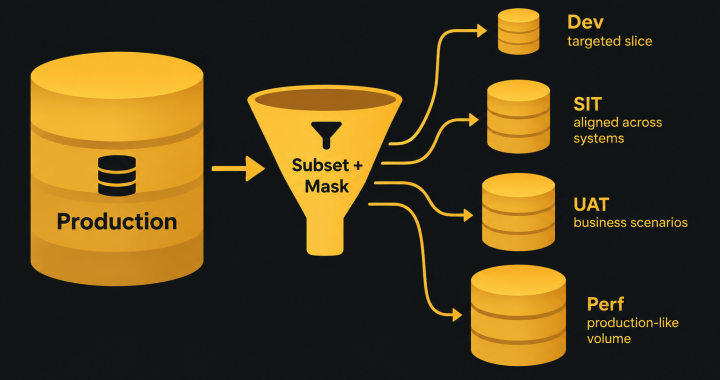
However, non-production environments are a common blind spot for detection. However, DLP, database activity monitoring and access reviews are usually focused on production, yet development, test, QA and UAT environments often hold full copies of production data with broader access. Moreover, extracts end up in spreadsheets, defect tickets and logs, well outside any monitoring.
- Firstly, inventory every non-production environment, including old ones, and record what data each holds.
- Secondly, scan non-production databases and file shares with the same discovery tools you use in production, or profile non-production data for sensitive fields as part of each refresh.
- Thirdly, test for values that should have been masked. Card numbers that pass a Luhn check, real email domains or names that match production are signs masking was skipped or failed.
- Check where test data travels. Search defect trackers, shared drives and application logs for sensitive values.
- Place canary records in production so you can tell if a production copy turns up somewhere it shouldn’t.
Ultimately, detection tells you there is a problem; prevention stops it recurring. See our guide to preventing data leakage in test environments for the controls, RACI and refresh checklist.
What to Do When You Detect Data Leakage
This is general guidance, not legal advice. Firstly, follow your incident response plan and involve your privacy and legal teams.
- Contain it. Next, remove public access, revoke credentials or sharing links, and stop the data flow.
- Preserve evidence. Keep logs and snapshots before you change more than you need to.
- Assess the scope. Then work out what data was exposed, whose it was, for how long and to whom.
- Notify where required. Many regulations set deadlines. Under GDPR, for example, a personal data breach must generally be reported to the supervisory authority within 72 hours of becoming aware of it, where feasible.
- Fix the root cause. Finally, close the gap that allowed the leak, not just the instance you found.
- Review and improve. Add the detection rule or control that would have caught it sooner.
Checklist: How to Detect Data Leakage
Print this section or copy it into your security runbook.
- ☐ You have discovered and classified sensitive data across production and non-production systems.
- ☐ DLP covers email, endpoints, web uploads and key cloud services, tuned to your classified data.
- ☐ You collect and retain database, identity, file and cloud audit logs centrally.
- ☐ Behaviour analytics or alert rules flag bulk exports, unusual queries and off-hours access.
- ☐ Cloud posture scans check for public buckets, open databases and risky sharing.
- ☐ Repository scanning checks code for credentials and sensitive data.
- ☐ External monitoring watches for your domains, credentials and data outside the organisation.
- ☐ You have planted canary records in your most sensitive data sets.
- ☐ You inventory non-production environments and scan them for unmasked sensitive data.
- ☐ Owners review access to sensitive data at least quarterly.
- ☐ An incident response plan covers containment, evidence, scoping, notification and root-cause fixes.
- ☐ Every detected leak leads to a new or improved control.
Conclusion
In short, the ability to detect data leakage comes down to three things: knowing where your sensitive data lives, watching how it moves and who touches it, and looking outside for signs it has escaped. Generally, most organisations already have some of these tools. The gaps are usually coverage, particularly in non-production environments, and tuning. Then close those gaps, rehearse your response, and treat every leak you find as a lesson for the controls that should have stopped it.
TestEnvironmentManagement.com is an Enov8 resource. Links to Enov8 pages are included where they add detail or show how a product addresses the problem described.