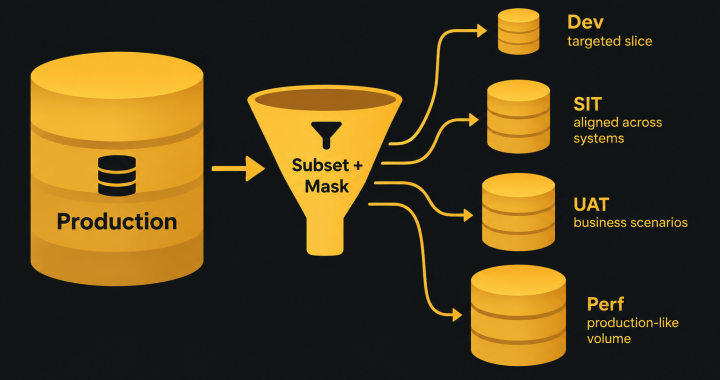
Most guides to data subsetting stop once the subset exists: pick a driving table, follow the foreign keys, mask, done. For anyone running test environments, that is where the hard part begins. For example, a subset that suits a developer’s laptop will sink a performance test. Similarly, a subset that works for one application will break an integrated SIT environment the moment a transaction crosses into the next system.
Therefore, this guide treats data subsetting as an environment-planning decision. It also covers how big each tier’s subset should be, how to select it, how often to refresh it, and how to keep subsets aligned across the systems that make up a shared environment.
Why one data subset doesn’t fit every environment
Data subsetting extracts a smaller, referentially intact slice of production data for use in non-production environments. (If you need a refresher on why “referentially intact” matters, see Referential Integrity Explained on DataOpsZone.)
However, the mistake many teams make is building one “golden subset” and loading it everywhere. Each environment tier exists to answer a different question, and each question needs a different data profile:
- Development asks “does my code work?” and needs a small, fast-to-load slice that covers the feature being built.
- System integration testing (SIT) asks “do the systems work together?” and needs the same business entities present in every connected application.
- User acceptance testing (UAT) asks “does this support the business?” and needs recognisable scenarios that testers can find and follow end to end.
- Performance testing asks “will it hold up under load?” and needs production-like volumes and distributions, which often means a minimal subset or none at all.
So, size the subset to the question the environment is there to answer, not to whatever storage happens to be free.
A data subsetting plan by environment tier
Use the table below as a starting point, then adjust for your data volumes, regulatory obligations and release cadence.
| Tier | Typical subset size | Selection method | Refresh cadence | Masking |
|---|---|---|---|---|
| Dev | Very small (often under 1% of production) | Targeted: specific customers, products or scenarios | On demand, per branch or sprint | Required |
| SIT | Small to medium (around 1–10%) | Shared driving set applied across every connected system | Per release or test cycle | Required, and deterministic across systems |
| UAT | Medium (around 5–20%) | Targeted business scenarios plus a recent time window | Per release, aligned to the UAT window | Required, with readable and realistic values |
| Performance | Large: production-like volume (50–100%) or a statistical sample scaled up | Representative sample that preserves distributions and skew | Before each major performance cycle | Required, without changing data shape or cardinality |
Two points stand out. Performance is the tier where aggressive subsetting does the most harm, because a sample that looks fine for functional testing hides index behaviour, lock contention and query plans that only appear at volume. SIT is the tier where the selection method matters more than the size, which leads to the next section.
Data subsetting for integrated environments: keeping systems aligned
In addition, most enterprise test environments are not one database. A SIT environment might include CRM, billing, a core platform, a payments gateway and a data warehouse, each with its own database and often its own owner.
Consequently, if you subset each one independently, you get a quiet failure. Customer 10482 exists in CRM but not in billing, so an end-to-end test fails on a missing record. The team logs it as a defect, and hours go into diagnosing what turns out to be a data gap rather than a code problem.
To keep subsets aligned across an integrated environment:
- Start from a shared driving set. Choose the business entities for the environment once (a list of customers, accounts or policies) and use that same list as the starting point in every system.
- Map the cross-application keys. Document how each system identifies an entity: customer ID in CRM, account number in billing, party reference in the core platform. Databases rarely declare these relationships as constraints, so no single tool will discover them for you.
- Mask deterministically. Equally, each identifier must mask to the same value everywhere it appears, or the alignment you built is lost in the masking step.
- Refresh the systems together. Refreshing one system’s subset while leaving the others in place reintroduces the mismatch. Above all, treat the environment, not the individual database, as the unit of refresh.
- Validate across systems after loading. Run a simple reconciliation, such as a count of driving-set entities found in each system, before handing the environment back to testers.
Fitting data subsetting into the environment refresh cycle
In practice, a subset is only useful if it arrives in the environment cleanly and on time. Build it into the refresh process rather than treating it as a separate data task.
- Book the refresh window. Reserve the environment so that no test cycle is running when the data changes underneath it.
- Notify the teams using it. Tell them what is changing, when the environment will be unavailable, and whether test data they created will be lost.
- Extract the subset from production or a protected copy, using the tier’s selection method.
- Mask before the data leaves the protected zone.
- Load into every system in the environment.
- Smoke test and reconcile. Confirm that applications start, key journeys work and the driving set is present in every system.
- Release the environment and record the data version, so that defects can be traced back to the data they were found on.
Steps 3 to 6, in particular, are where automation pays off. Doing them by hand turns every refresh into a multi-day project, and the usual result is that teams stop refreshing and test against stale data instead. Therefore, a dedicated data subsetting tool removes most of that effort. Enov8 DataFactory’s Prune feature, for example, lets you pick your anchor tables once, save them as a reusable virtual data set, and cut a subset anywhere from 1% to 100% of production with every foreign-key relationship intact. It only reads from the source database, and its REST API lets a refresh pipeline request a fresh subset as one automated step. Prune output is still real data, so pair it with masking before it reaches the environment.
Signs a subset is wrong for the environment
A mismatched subset usually shows up as testing problems before anyone suspects the data. Watch for these symptoms:
- UAT testers can’t find their scenarios. Someone selected the subset by volume or date rather than by business scenario.
- SIT defects close as “data issue, not a bug”. Subsets aren’t aligned across the integrated systems.
- Performance results don’t match production. The data is too small, or its distribution and skew don’t reflect production.
- Developers keep hand-crafting records. The dev subset is missing the edge cases the feature needs.
- Teams rarely refresh the environments. The process is too slow or manual, and the data has drifted from production.
If subsetting is not the right tool for a particular risk, compare it against the alternatives in our guide on how to choose a test data protection method.
Pre-refresh checklist
- Have the tier’s subset size and selection method been agreed with the teams that use it?
- Is there a shared driving set for every system in the environment?
- Are cross-application keys documented and included in the subset rules?
- Is masking deterministic across every system?
- Is the refresh window booked and have the affected teams been notified?
- Is there a post-load smoke test and cross-system reconciliation?
- Will the data version be recorded against the environment?
Conclusion
Subsetting is often discussed as a database technique, but in practice it is an environment-management decision. Right-sizing data to each tier, keeping integrated systems aligned and building the subset into a disciplined refresh cycle is what turns a smaller database into a test environment people can trust.
To see how subsetting by tier works on your own schema, explore Prune in Enov8 DataFactory.