Test Data Management

5 Steps to Better Test Data Management

Forward

I always say that it's important to test in production because nothing compares to a production environment. But it wouldn't be very professional of you to test only—and directly—to production. Testing in production usually gives the impression that you didn't care enough to test before you reached the production stage.

But I'd say that in order for you to even dare to test something in production, you need to have run a set of tests previously in a similar environment—including all the data you need for testing.

That's where test data management (TDM) comes in.

TDM is the process of creating test data that's similar to the real data being used in a production environment. Developers and testers use this non-production data to be more confident that the new software changes aren't going to break anything during the release.


A good testing strategy is usually accompanied by testing data taken from production. Developers sometimes use funny, dummy, and non-real data as well. But what are the steps that you need to follow in order to create good TDM data?

Top 5 Considerations

#1 Only Use the Data You Really Need

If you don't know where to go for your next vacation, just book the next flight and start packing. You might have the best experience of your life...or the worst. If you don't know what data you really need for testing, you might just use it all. That approach has pros and cons, so when you test software without having an idea of which scenarios you need to test, you'll want to have an exact copy of the production database because it's the easiest way to start testing with real data. Otherwise, you'll end up spending too much time and money waiting to get your copy of the data for testing.

When you start creating your testing process by building the list of test cases you'll need, it becomes pretty obvious how much and what type of data you're going to need. More importantly, think about your testing process as an iterative one. If you start testing the login page, you don't need to have all the information from the user for that test case, such as their birthdate or home address.

As you keep iterating, you're going to need more testing data. And as you find more bugs, you're going to need more real data. Unless you need to run stress tests, subsetting data is going to be enough for the majority of the test cases. And even if you still need to validate that the system can handle high waves of traffic, you can also generate varied static data for that purpose. More on this later.

Taking small sets of your production database should be enough for most of the tests you'll run to validate the software. You'll also reduce costs and complexity when building only the test data you really need at the moment.

#2 Avoid Having Sensitive Data for Testing

We've seen a lot of recent GDP-related lawsuits involving big companies in Europe. Europe is taking data protection more seriously than other countries. Pretty soon, regulations like GDPR will be implemented on other continents too. If GDPR is already affecting other companies, we better avoid having unprotected sensitive data in our testing environments.

SOX compliance regulation fosters a separation of duties within an organization. I've worked with these type of regulations. In my experience, auditors only want to see that only certain people have access to the production environments. These people with privileged permissions are legally responsible for what happens with customer data.

Even with regulations in place, data is still leaked. We have to be prepared for that, so you should operate as if you expect the information you're storing will be stolen someday. Mask any data that could identify a person, or what's also called personally identifiable information (PII).

Use irreversible methods to mask data so that it's difficult to unmask it. And make sure you're constantly checking that PII is protected. Managing test data will be simpler and easier if you create subsets of the data to fulfill your different testing needs. And you won't have to worry about giving sensitive data to developers or whoever needs production data for testing.

Ideally, try to avoid having sensitive data. But since sometimes you can't avoid it, try to keep PII data at a minimum, and securely mask the data you need to have.

#3 Build Synthetic Data for Better Efficiency

Even though you decided to mask sensitive data—especially if the data is going to be used for testing purposes—you want to make the security gap as small as possible by not including sensitive data in your tests (even if it's masked). One way to improve security is to replace real data (like credit card numbers) with autogenerated dummy data. That's synthetic data, and it will help you get more efficient results in testing.

You can take advantage of the synthetic data approach by using more realistic data than just dummy data. For example, you might have a user called Joe in your records, but for testing purposes, you decided Joe will be called Jeremy. This gives you a chance to run machine learning experiments where you can learn more about "Jeremy's" preferences without knowing that Jeremy is actually Joe. You're protecting Joe, even if the data is leaked or misused.

Synthetic data makes real data more shareable because you only have the data you need. Why would you need to know a person's name if you're just trying to replicate a bug in production? You're only interested in knowing which paths through the system's workflow the user took. What matters is why the data ended up in a certain state that caused the software to break. You can then decide either to ignore the person's name or replace it with other "real" data.

If you need to have large amounts of data for performance testing, you can use synthetic data to double the size of the database. Along with the previous benefits we discussed, synthetic data makes your tests more efficient by only using the data you need to cover specific test scenarios.

#4 Create Test Data As a Self-Service Model

DBAs are in charge of generating testing data. They know the best ways to do it and what data is sharable among teams (as I explained in the previous section), and sometimes they're the only ones who have access to production databases. When this happens, the DBAs become a bottleneck, and the time spent in the testing stage increases.

That's why you should create test data as a self-service model. It's not just so you don't constantly interrupt DBAs when a developer or tester needs data. The ability to automatically have testing data will let you parallelize the boring task of manually generating data for testing. Do you need to reduce the testing time? Fine. Create more subsets of testing data in parallel and distribute the test cases.

Another benefit of having a self-service model is that you can easily drop and re-create environments on demand. By doing this, you ensure repetition and predictable results when preparing testing data. It's also easier to include TDM in your CI/CD pipeline, which brings you closer each day to one-click deployments.

Creating a self-service model is far from an easy task. So it's important that DBAs, developers, and testers work together to create this model. Not all of them have the same needs and objectives. Join experience, knowledge, and skill to create a better model for data testing.

#5 Keep Testing Data up to Date

Last but not least, keep your testing data up to date. Your software will continue evolving, so the test scenarios and the data they need will keep changing over time too. Some test scenarios will become obsolete, and so will their data. Try to always keep the house clean by making sure you're only generating the testing data you really need regarding its relevance in time.

This process takes discipline, and good communication within the team always helps. Developers need to inform everyone which tests are no longer needed and when it's OK to remove them. And either DBAs or testers need to keep confirming that the data they're using for tests is still valid and relevant.

Keeping data fresh might seem like common sense. But I've seen delivery pipelines where tests continue to grow, even though some of the features no longer exist. Sometimes we get too extreme about trying to have a high percentage of test coverage, which isn't efficient.

Having up-to-date testing data will help you have higher quality TDM.

Benefits: Better Test Results With Better Testing Data

I'd say that testing is the most important stage of any software release life cycle. The more quickly you can verify that everything is still working, the better. Always keep the mindset that parallelizing testing will help you to speed up the process. For that, you need to have better test data quality, and it's not always necessary to have an exact replica of what you have in production. In fact, if you don't, it may help you in the cost, security, or speed departments.

It's important that you start by defining what you truly need and iterate from that. Automation helps with repetitive and boring tasks, but you need to continue taking account of the human side of things in the equation to generate data for testing purposes.

TDM helps you provide only the data you need, on time and securely.

Author:  Christian Melendez 

Further reading suggestions: Holistic Test Data Management

 

Data Environments Evil Twin

Data! Environments Evil Twin – Top Breaches 2017

Preamble

Data is without doubt the evil twin when it comes to managing your Environments. It is just so complicated both internally, within an individual database and at a more holistic level i.e. where data and the inherent relationships span the organization.

A complexity that ultimately exposes the organization to all kinds of challenges, one of the main ones being the likelihood unwanted information (for example Customer Personally Identifiable Information) will appear (or leak into) the wrong places for example your Development, Integration and Test Environments* or worse still onto the public internet. A sub-optimal situation when one considers 70% (Source Gartner) of breaches are committed internally.

Tip*: Don’t ignore Non-Production, as that’s where projects spend 95% of their time.

Anyhow here's a post from TJ Simmons on some of the top breaches from last year.

Top 5 Data Breaches of 2017

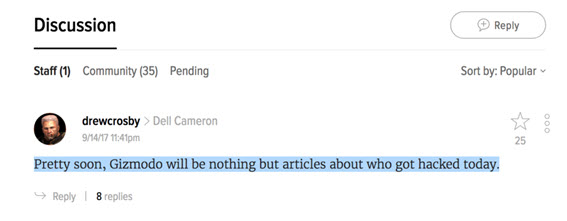
Back in September 2017, news broke about a group called OurMine hacking Vevo. OurMine got away with 3.12TB of Vevo's data and posted it online. That's when I came across this comment on Gizmodo:

Gizmo Data Hacking

That comment says it all. Every other day, it seems like another company is on the receiving end of a data breach. Most security experts will tell you that the data breaches we know of so far are merely the tip of the iceberg. One expert noted in 2015 that we should expect larger hacks to keep happening. And larger hacks have kept happening, leading to bigger and messier data breaches.

The following is a compilation of the worst data breaches of 2017. Usually, companies discover data breaches long after the actual breach impact. Therefore, I will organize these breaches in chronological order based on when the data breach was made known, not based on the date the breach actually happened. Just like how I selected the top IT outages of 2017, I selected the following five breaches based on the impact to the customers and to the affected business' reputations.

  1. Xbox 360 ISO and PSP ISO (Reported: Feb. 1, 2017 | Breach Happened: ~2015)

The forum websites Xbox 360 ISO and PSP ISO host illegal video game download files. They also house sensitive user information such as email IDs and hashed passwords. According to HaveIBeenPwned, a website that helps users check if their personal data has been compromised, Xbox 360 ISO and PSP ISO had a combined 2.5 million compromised user accounts. The attacks happened way back in September 2015 and no one discovered them until February 2017. The compromised information consisted of stolen email IDs, IP addresses of the users, and salted MD5 password hashes.

The biggest takeaway for consumers: avoid shady websites like Xbox 360 ISO. Trusting websites that host illegal material with your personal information is dangerous. On the plus side, at least both websites hashed their users' passwords. If your website is holding onto users' passwords, please implement the most basic of security measures by hashing those passwords.

  1. Deloitte (Reported: September 2017 | Breach Happened: March 2017)

In the same year that Gartner named Deloitte "number one in security consulting for the fifth consecutive year," Deloitte faced an embarrassing data breach. Deloitte, a multinational professional services firm, saw its clients' confidential emails exposed when a hacker gained unauthorized access to its company email system. The affected clients included blue-chip companies, well-known firms, and US government departments. What caused the hack? Apparently, the main administrator account required a single password and Deloitte had not instituted two-step verification for that account.

The Deloitte hack is a great example of how even the most security-conscious firms can make security missteps. We need to learn from Deloitte by identifying and eliminating all possible loopholes in our own companies' IT setups, the sooner the better.

  1. Equifax (Reported: September 2017 | Breach Happened: July 2017)

If you asked a regular Joe if they can recall any major data breach from 2017, chances are they will cite this one. Equifax, one of the top three US credit agencies, suffered a breach affecting nearly 143 million consumers. Given the sensitivity of the stolen data and the number of people affected, this breach has been considered "one of the worst data breaches ever."  The stolen data included Social Security numbers, driver’s license numbers, full names, addresses, dates of birth, and credit card numbers.

In response to the breach, Equifax set up a website called equifaxsecurity2017.com to which it directed consumers who wanted to know if their data had been stolen. Some users reported that the website did not work. And many were angry to find out that in order to use the website, they would have to agree to an arbitration clause stating that they would waive their rights to a class-action lawsuit. Some users even tried entering fake names and fake Social Security numbers, and the website's response—informing them they "may be affected by the breach"—increased skepticism about the website's validity.

The bigger your organization, the more information you have. If the information you have is sensitive, you will become a bigger target for data breaches. Equifax holds a great volume of highly sensitive information. This should lead to a corresponding increase in security measures, but clearly there is a gap between what should be done and reality. Learn from Equifax and be honest when assessing your existing security measures. Is there a gap between where they are and where they ought to be?

  1. Yahoo! Update (Reported in 2016 | Updated on October 9, 2017 | Breach happened: ~2013)

Yahoo! had already reported this breach back in December 2016, revealing that "one billion user accounts were compromised" in a 2013 hack. Turns out they underestimated the impact of the breach in the original report. Then-CEO Marissa Meyer subsequently told Congress that the 2013 data breach had affected all three billion of their user accounts. In other words, every single Yahoo! user account from popular services such as email, Tumblr, Fantasy, and Flickr suffered from the breach. After extensive investigations, the culprits' identities are still unknown.

Yahoo! is a classic case of a company with so many interdependent services that the complexity gives hackers opportunities to exploit. Notice how Yahoo! is still unable to identify the culprit? That speaks volumes to the challenges facing companies with a wide range of systems. You cannot plug the loopholes that you don't know exist. In other words, you need to start by knowing exactly how your internal IT systems work together.

  1. Uber (Self-Reported: November 21, 2017 | Breach happened: ~2016)

On November 21, Uber CEO Dara Khosrowshahi published a post revealing that he had become aware of a late-2016 incident in which "two individuals outside the company had inappropriately accessed user data stored on a third-party cloud-based service" that Uber uses. This breach affected 57 million users and further damaged Uber's already faltering brand. The stolen information included names, email addresses, and phone numbers.  Approximately 600,000 of the 57 million affected users were drivers who had their license numbers accessed by hackers.

What made things worse was that Uber paid the hackers 100,000 dollars to destroy the stolen data. As a result, Uber got even more bad press. Uber is an ambitious startup chasing high growth rates that emphasizes scale and agility above everything else. But in hindsight, they clearly needed to emphasize security as well. With consumers becoming more data-aware, security-conscious companies can gain an edge on their competitors.

Conclusion: Manage Data Security? Get Clarity on Your Company's Systems First

Given the complexity of enterprise IT systems, hackers can now find more loopholes to get past your company's security measures. Therefore, having a clear big picture on how your systems work together is a security priority. We've seen how even the biggest and most security-conscious firms (remember Deloitte?) can fall prey to data breaches, precisely because their complexity makes it much harder for them to identify and prevent hacks. With that in mind, consider an enterprise-level dashboard that can show you that big picture vision that will help both your security and your productivity.

As Peter Drucker once said about executive effectiveness, "you can't manage what you can't measure." Most organizations will have some way to measure security readiness. But do they have a way to measure and make visible how their systems work together? Knowing how your systems work together makes you better prepared to identifying root causes for potential hacks. If you can plug the gaps before they can be exploited, you can reach zero outage and zero breaches.

Author TJ Simmons

TJ Simmons started his own developer firm five years ago, building solutions for professionals in telecoms and the finance industry who were overwhelmed by too many Excel spreadsheets. He’s now proficient with the automation of document generation and data extraction from varied sources.